Chapter 1 : Computer System
Introduction
The word "computer" comes from the Latin word "computare" which means to calculate. So a computer is normally considered to be a calculating device that can perform arithmetic operations at fast speed.
Definition
In simple terms, any electronic machine that can perform IPOS (Input Process Output Storage) cycle is known as computer.
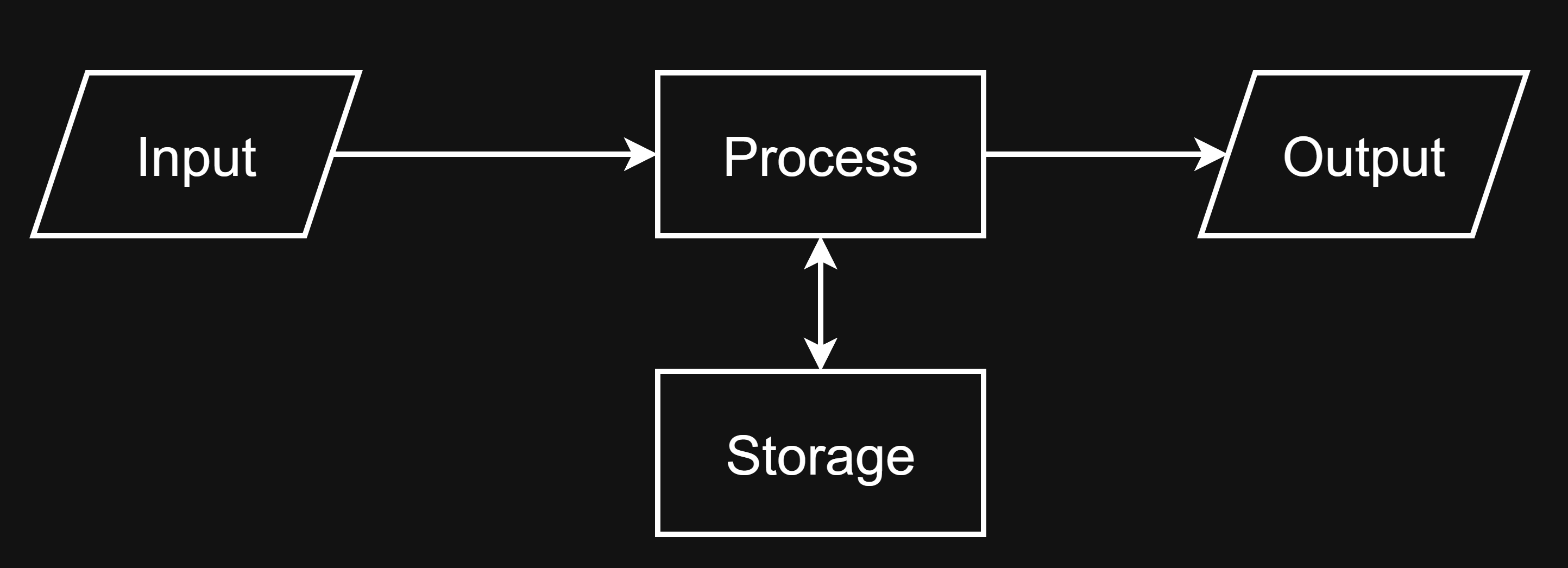
An electronic device which accept raw data, process the data, stores the data for future use and gives the desired information (result) as output, such a device which have memory is called computer.
Characteristics of Computer
Following are some of the features of a digital computer:
1. Speed — Computer can calculate very complex data at a very fast rate that human being may not be able to do. The speed of the computer is measured in terms of fraction of second.
2. Diligence — It Means, is absolutely free from physical tiredness and mental fatigue. Because a computer has maximum capacity to perform any kind of tasks repeatedly at the same level of timing periods.
3. Versatile — Computers have multi-purpose capacities. A computer can do any types of jobs at the same time. That's why computers are versatile devices. At the same level of period of timings, it provides loading an environment to run many of tasks as we needed.
4. Reliability — It is the most recent demand and means in real life of all human beings. Men are imperfect but it has capable to make copy from them. So the modern age is depending onto it because of its capabilities a lot.
5. Automatic — Computer is an automatic machine. Everything that is given to computer are processed and done by computer automatically according to the instructions provided.
6. Accuracy — The result of the computer is 100% accurate if the input data are correct.
7. Storage Capacity — Computers have data storage devices. It stores the data permanently or temporarily. There are mainly two types of storage devices (Primary and Secondary). The capacity of the storage is measured in terms of bytes. The small unit is bit (0 or 1). Computers stores the data form of bit.
8. Word Length — A computer can process 16 bits, 32 bits and 64 bits data at a time. The number of bits the computer can process at a time known as word length.
Application (Use) of Computer
| Field | Applications |
|---|---|
| Education | E-learning, digital classrooms, online exams |
| Healthcare | Patient records, medical imaging, diagnosis |
| Business | Accounting, inventory management, e-commerce |
| Communication | Email, video calls, social media |
| Science & Research | Simulations, data analysis, weather forecasting |
| Entertainment | Gaming, streaming, animation, multimedia |
Capability and Limitation
| Capability | Limitations |
|---|---|
| Computer produces 100% accurate outputs, if correct data and instructions are provided. | Computer is the non-intelligent machine (dull machine). It cannot think and give the right decision as human beings. |
| It is faster calculations than human. | It cannot operate without battery or electricity. |
| It can perform complicated and difficult work at a high speed. | Failure in devices and wrong information by users makes it unreliable. |
| It is capable of permanently storing data and retrieving it whenever required. | It cannot memorize or recall as needed only store data in secondary memory. |
| It can perform repeated task with the same speed and accuracy. | It requires instructions to perform a task. |
Advantages and Disadvantages of Computer
Advantages
- Computer is faster than human being and any other devices ever invented.
- It is always accurate and reliable than human.
- It is versatile i.e. master in all types of work and fields like education, hospital, banks etc.
- It can be used for communication among many users.
- It never feels exhausted and tired as human being.
Disadvantages
- Computer can be used for computer crimes like hacking, creating and sending viruses, etc.
- It has increased dependency on machine.
- It is still expensive so each and every people cannot afford the computer.
- Repair and maintenance is required frequently.
- Skilled manpower is required to work in the computer.
History of Computer
| Device | Inventor | Date | Used For | Description |
|---|---|---|---|---|
| Abacus | In China | 1200 AD | Counting | Two parts: Heaven (2 beads in each rod), Earth (5 beads in each rod) |
| Napier's Bones | John Napier | 1614 AD | Addition, Subtraction, Multiplication | — |
| Slide Rule | William Oughtred | 1620 AD | Multiplication, Division, Square roots | — |
| Pascaline | Blaise Pascal | 1642 AD | Addition and Subtraction upto 8 digits | First mechanical calculator |
| Stepped Recknor | Gothfried Von Leibnitz | 1671 AD | Addition, Subtraction, Multiplication, Division | — |
| Jacquards Loom | Joseph Marie Jacquard | 1802 AD | Automated Weaving | Could be programmed & used large cards with holes punched in them |
| Difference Engine | Charles Babbage | 1822 AD | — | — |
| Analytical Engine | Charles Babbage | 1833 AD | Calculate upto 20 decimals at about 60 additions per minute | Could store information, make decision, carry out instruction on its decision |
| Tabulating Machine | Dr. Herman Hollerith | 1886 AD | Census calculating | Punched card tabulating system in data processing |
| Mark-I | Howard Aiken | 1937–1944 AD | — | 50ft long, 8ft tall, 3ft wide, 18000 vacuum tubes. First electromechanical calculator |
| ABC (Atanasoff Berry Computer) | JV Atanasoff and Clifford Berry | 1939–1942 AD | — | First electronic digital computer. Could store data & information. Has memory consisting of 45 vacuum tubes |
| ENIAC | J.P Eckert and J.W Mauchly | 1943–1946 AD | Military purpose | 30 tons, require 160kW of power, 17468 vacuum tubes, 70000 resistors, 200 microsecond for addition, 3 millisecond for 10 digit multiplication |
| EDSAC | Maurice Wilkes | 1947–1949 AD | — | 1500 microsecond for addition, 4000 microsecond for multiplication, require 30KW of power, 3000 vacuum tubes. First operational stored program computer |
| EDVAC | John Von Neuman, J.P Eckert and J.W Mauchly | 1946–1952 AD | — | 4000 vacuum tubes, 10000 crystal diodes |
| UNIVAC | J.P Eckert and J.W Mauchly | 1951 AD | Commercial trade & general purpose computer | 8ft high, 15ft long, 5 tons |
Generation of Computer
The advancement in Hardware technology with the span of time is termed as Computer generation. Or the development of the computer took place a stage and each stages is called the generation of computer. There are Five Generations:
First Generation (1945–1955)
| Property | Detail |
|---|---|
| Electronic Circuit | Vacuum Tubes |
| Input | Punched Cards |
| Output | Paper |
| Storage | Magnetic Tape |
| Language | Machine Level Language |
| Speed | Millisecond |
| Example | UNIVAC-1, IBM-650, 702, 705, BURROUGS-220, EDVAC, EDSAC, Mark-II, UNIVAC-II etc. |
Second Generation (1956–1965)
| Property | Detail |
|---|---|
| Electronic Circuitry | Transistors |
| Input | Punched Card |
| Output | Paper |
| Storage | Magnetic Core Storage |
| Language | Assembly Language |
| Speed | Microsecond |
| Example | IBM-1400, IBM-7000, Control Data-3600, General Electric-635, Honeywell-200, SS-80 NCR-300 CDC 1604 etc. |
Third Generation (1964–1971)
| Property | Detail |
|---|---|
| Electronic Circuitry | Integrated Circuits (IC), LSI |
| Input | Punched Cards, Keyboard |
| Output | Paper, Monitor |
| Storage | Magnetic Disks, Magnetic Tapes |
| Language | High Level Language |
| Speed | Nanosecond |
| Example | IBM System/360, UNIVAC 1108, UNIVAC 9000 series |
Fourth Generation (1971–At Present)
| Property | Detail |
|---|---|
| Electronic Circuitry | VLSIC (Very Large Scale Integrated Circuits) |
| Input | Keyboard, Mouse, Scanner etc. |
| Output | Paper, Monitor, Plotter, Printer |
| Storage | Magnetic disk, Optical disk, DVD etc. |
| Language | HLL and 4th GL |
| Speed | Picosecond |
| Example | IBM System/370, HP-3000, AMD Athelon, Pentium etc. |
Fifth Generation (Future)
| Property | Detail |
|---|---|
| Electronic Circuitry | BIO Chips (Organic Chips) |
| Technology | AI, Expert Systems, high Speed, large Storage capacity, Multi-point input and output etc. |
| Example | Intelligent Robot, etc. |
Types of Computer
Classification of Computers
| Basis | Types |
|---|---|
| Principles of Operation | Analog Computer, Digital Computer, Hybrid Computer |
| Size | Super Computer, Mainframe Computer, Mini Computer, Micro Computer |
| Brand | IBM PC, IBM Compatible, Apple/Macintosh |
| Model | PC/XT (Personal Computer/Extended Technology), PC/AT (Personal Computer/Advanced Technology), PS/2 (Personal System/2) Model |
On The Basis of Operation
Analog Computer — The computer which can process analog quantities (continuous data) is called an analog computer. It is specially designed to compute physical forces such as temperature, pressure etc. Presley is an example of analog computer.
Digital Computer — The computer which works on discrete data (discontinuous data, binary system or 0 or 1) is known as digital computer. For Example, IBM PC, IBM compatible, Apple/Mac. computer etc.
Hybrid Computer — A Computer, which has combined features of both analog and digital, is known as hybrid computer. It can convert data from analog to digital and digital to analog. These computers are used for scientific research and hospitals. Some of the characteristics of Hybrid Computer are:
- It is a combination of qualities of analog as well as digital computers.
- It can process both continuous and discrete data.
- It has capability to convert one type of data into another.
- It is the special purpose machine.
- It usually has high cost compared to analog and digital computer.
Difference Between Analog and Digital Computer
| Analog Computer | Digital Computer |
|---|---|
| These computers work with natural or physical values. | These computer work with digits. |
| It works upon continuous data. | It works upon discrete data. |
| It operates by measuring and comparing. | It operates by counting and adding. |
| Its accuracy is low. | Its accuracy is high. |
| Output is continuous. | Results are obtained after complete computation. |
| It is special purpose computer. | It is general purpose in nature. |
| No any or smaller storage capacity. | Larger storage capacity (memory). |
| Lower cost compared to digital computers. | Higher cost compared to analog computers. |
| Normally, it cannot be reprogrammed. | It can be reprogrammed. |
| Example: Presley. | Example: Desktop computers. |
On the Basis of Size
Super Computer
- Most powerful and fastest digital computer
- Special purpose computer
- Performs billions of instructions per second
- Computing capacity equal to 40,000 microcomputers
- Uses parallel processors
- Requires large space
- Requires temperature-controlled room
- Uses: weather forecasting, scientific research, satellite communication, nuclear research, molecular modeling, study of DNA structure
- Examples: CRAY X-Mp/24, PARAM, ANURAG, etc.
Mainframe Computer
- High processing power but lacks flexibility
- Designed for large-scale data processing
- Large in size, occupies about 1000 sq. ft. area
- Supports more than 100 terminals
- Used in banks, insurance companies, airlines, railway reservation systems
- Also used in networked systems
- Examples: IBM 1401, ICL 2950/10, ICL 39, CYBER 170, etc.
Minicomputer
- Smaller in size and cost compared to mainframe computer, hence called mini computer
- First released in the 1960s
- Capabilities lie between mainframe and microcomputer, so also called midrange computer
- Supports about 50 terminals
- Used in small business organizations, industries, universities, banks, etc.
- Examples: Prime 9755, VAX 7500, HCL, MAGUM, etc.
Micro Computer
- Based on microprocessor
- Small, low cost digital computer
- Requires small space — can be placed on table or kept inside a briefcase
- Has CPU on a single chip
- Used in office, house, school, shop, store
- Smallest types: laptop, notebook, palmtop, PDA
- Examples: IBM PC, Apple/Macintosh
Categories of Microcomputer
Microcomputers are divided into two categories:
- Non-portable category
- Portable category
A. Non-Portable Category
1. Personal Computer (PC)
- Small computer, fits on normal-sized office table
- Designed for use by one person at a time
- Most common computer
- Found in office, college, home, hospital, shops
2. Workstation Computer (WC)
- 5 to 10 times faster than PC
- Larger main and backup memory
- Larger, high-resolution monitor
- Accelerated graphics handling capability
- Suitable for architectural/engineering design, modeling, animation, video editing
B. Portable Category
1. Laptop
- Portable, easy to carry
- Suitable for people on the move
- Lightweight, has all basic features of a computer
- LCD (Liquid Crystal Display) monitor
- Can operate on AC or DC (battery) power, or both
2. Notebook
- Designed for people on the move
- Smaller in size compared to laptop
- Reduced keyboard, screen, functionality, and software support
3. Tablet PC
- Looks similar to laptop/notebook but more convenient
- Differs in accessories, screen, software used
- Allows writing directly on screen using a pen instead of keyboard
- Has handwriting recognition software that digitizes handwritten text
4. Palm Top
- Portable PC, size of a palm
- Very small memory and features compared to laptop/notebook
- Used for storing phone numbers, addresses, pictures, small data
- Has electronic writing pad and light-sensitive electronic pen for input
5. PDA (Personal Digital Assistant)
- Limited in tasks it can perform
- Modern PDAs include: colored screen, scientific calculator, digital diary (phone numbers/addresses), web browser, cell phone, audio-video, games
Concept of Computer Architecture and Organization
- The design, arrangement, construction or organization of the different parts of a computer system is known as Computer Architecture.
- It is the conceptual design and fundamental operational structure of a computer system.
- It is a framework and functional description of requirements and design implementations for the various parts of a computer, focusing largely on the way by which the CPU performs internally and accesses addresses in memory.
- Computer Organization refers to the operational units and their interconnections that realize the architecture specification.
- Computer organization deals with physical aspects of computer design, memory and their types as well as the microprocessor design.
Components of Computer System
A computer system consists of the following components:
1. Input Hardware
- Most computers cannot accept data in human forms like speech or handwriting
- Data must be presented in a way that is easily convertible into electronic form
- Commonly done by typing data into a keyboard, which converts it into machine-sensible form
- Keyboard is just one of many input devices
- In some cases, machine-readable documents or media are produced as part of the input process
2. Output Hardware
- Provides processed results to the user
- Result is taken from main storage and fed to an output device
- Two forms of output:
- Hardcopy output: Printed form (via printer)
- Softcopy output: Displayed on monitor screen (like a TV screen)
3. Processing Hardware
- Instructions are obeyed and necessary arithmetic operations carried out on data
- Arithmetic-Logical Unit (ALU):
- Performs arithmetic and logical operations
- Usually not a physically separate component (same for control unit)
- Operations occur at very high speed (e.g., millions of numbers summed in under a second)
- Control Unit:
- Controls the operation of the computer
- Fetches instructions from main storage
- Interprets instructions
- Issues necessary signals to system components
- Directs all hardware operations needed to obey instructions
4. Storage Hardware
- Data and instructions are stored and held until needed for processing
- Instructions dictate what actions are to be taken on data
- Results of actions are held until required for output
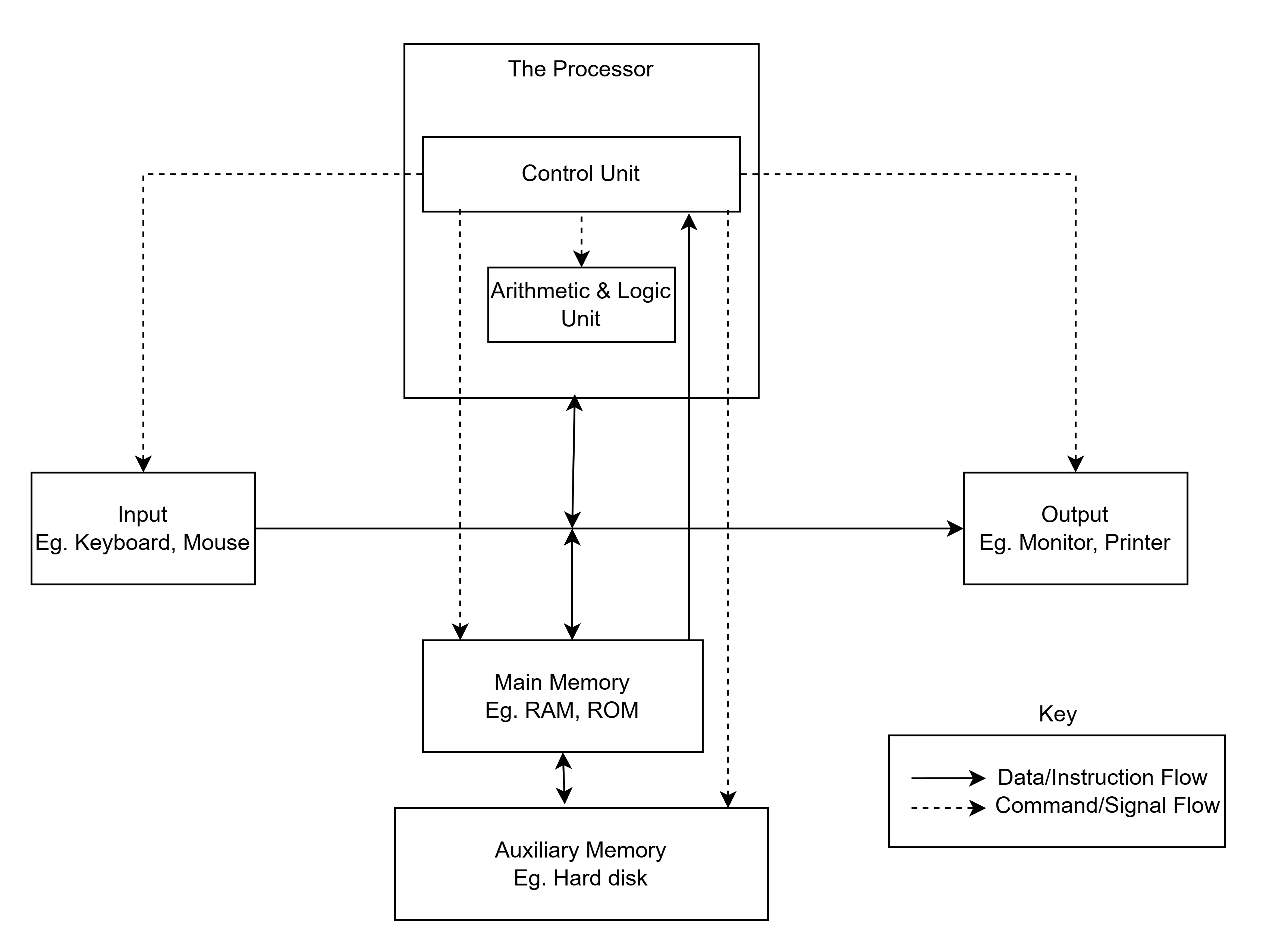 Fig. Elements of computer system showing logical structure
Microprocessor
Basic Concepts
- Multipurpose, programmable, clock-driven, register-based electronic component
- Fabricated on a single IC (Integrated Circuit) chip
- Capable of performing Arithmetic and Logical Unit (ALU) operations
- Communicates with other connected components
- General purpose device, applicable to a wide range of applications
- Reads binary instructions from an input device or primary memory
- Accepts binary data as input, processes data according to instructions, provides results as output
- First microprocessor: Intel 4004 developed by Intel Corporation in 1971
- Functions like an "artificial brain"
Functions of the Microprocessor
- Carries out processing instructions in and out (fetch) from main memory
- Gives commands to all parts of the computer system
- Controls the sequence of operations
- Controls the storage of data or instructions
- Performs arithmetic calculations (addition, subtraction, etc.)
- Supervises and controls I/O (Input/Output) devices, in addition to execution
Clock Speed
- Every microprocessor/CPU contains a clock along with the Control Unit (CU)
- Clock generates the speed at which instructions are executed
- Synchronizes all components of the computer
- Also known as Clock Rate
- Measured in Megahertz (MHz) or Gigahertz (GHz)
- 1 MHz = 1 million cycles per second
- 1 GHz = 1 billion cycles per second
- Greater the speed → more instructions performed
- Today's PCs: clock speeds up to 5 GHz
Problem with High Clock Speed: High clock speed generates heat due to friction, which can damage the microprocessor chip.
Word Length
- Number of bits a processor can process in a single instruction
- Also called word size
- Determines:
- Amount of RAM that can be accessed
- Total number of pins on the microprocessor
- Higher word size → faster CPU instruction execution
- Word length ranges from 4 bits to 64 bits (depending on type of microcomputer)
- Most current microprocessors use 32-bit or 64-bit architecture
Components of Microprocessor
The microprocessor consists of mainly three components:
- Arithmetic Logic Unit (ALU)
- Control Unit (CU)
- Register Array (Set of Registers)
1. Arithmetic and Logic Unit (ALU)
- Performs mathematical computations and logic operations
- Controls the speed of these operations as directed by the CU
- Also executes comparisons and logical testing
Calculations performed by ALU:
- Addition, subtraction, multiplication, division
- Logical operations: AND, OR, XOR, NOT
- Increment and decrement
- Left or right shift (content of accumulator shifted left/right by one bit)
- Clear (content of accumulator or carry flag made zero)
- Exponential, logarithmic, trigonometric, and floating-point operations
2. Control Unit (CU)
- Controls the entire operation of the computer
- Receives signals from CPU to move data between microprocessor, memory, input, and output devices
- Acts as the nerve system of the computer system
- Consists of multiple components: Decoder, Flag, Quartz crystal, Control logic circuits
Functions of the Control Unit:
- Controls and coordinates sequence of data movements around ALU, registers, memories, input and output devices
- Fetches instructions from memory, decodes and interprets them, and executes the task
- Issues control signals that control hardware components within the CPU
- Gives orders to ALU and directs operation of the whole computer system
- Generates timing/clock speed to count the instruction cycle of the computer
- Provides status of every device connected to the computer to check its functionality
- Receives external instructions/commands and generates a sequence of control signals
3. Register Array
- Registers = temporary data holding places in the microprocessor
- Small amounts of high-speed memory contained within the CPU
- CPU contains multiple registers for program execution
- Used to handle movement of information between various units of the computer and to speed up processing
- Most CPUs today have 32-bit or 64-bit registers
Registers are needed during processing for:
- Address of the next instruction to be executed
- Current instruction being decoded
- Results of calculations of frequently used small amounts of data
Functions of Common Registers
| Register | Full Form | Function |
|---|---|---|
| MAR | Memory Address Register | Holds the address of the active memory location; loaded from program control register when an instruction is read from memory |
| MBR | Memory Buffer Register | Holds the contents of the accessed (read/write) memory word; a word to be stored in memory must first go through MBR |
| PCR | Program Counter Register | Holds the address of the next instruction to be executed |
| AR | Accumulator Register | Holds data to be operated upon, intermediate results, and final results; results of arithmetic operations are sent here, then transferred to main memory via MBR |
| IR | Instruction Register | Holds the current instruction being executed; splits into address part (→ MAR) and operation part (→ CU for decoding) |
| I/O Register | Input/Output Register | Used to communicate with input and output devices |
Bus System
A bus is a collection of wires, chips, and slots inside the computer through which data is transmitted from one part of the computer to another. Often compared to a highway — pathways on which data travels. It is a set of parallel distinct wires, serving different purposes, allowing devices to communicate with the CPU.
Functions of the Bus:
- Carries information from one component to another
- Carries data, address, or control signals
- Allows one component to interact with others
Types of Bus
| Bus | Direction | Function |
|---|---|---|
| Control Bus | Mixed | Carries control signals; generated from the Control Unit within the CPU; controls and coordinates various activities across the computer |
| Address Bus | Unidirectional (processor → peripherals) | Carries memory addresses; allows CPU to reference memory locations; wider bus path = faster processing speed |
| Data Bus | Bidirectional (processor ↔ memory/peripherals) | Transfers data from one location to another; may be 16-bit or 32-bit; electrical path connecting CPU, memory, and other hardware devices on the motherboard |
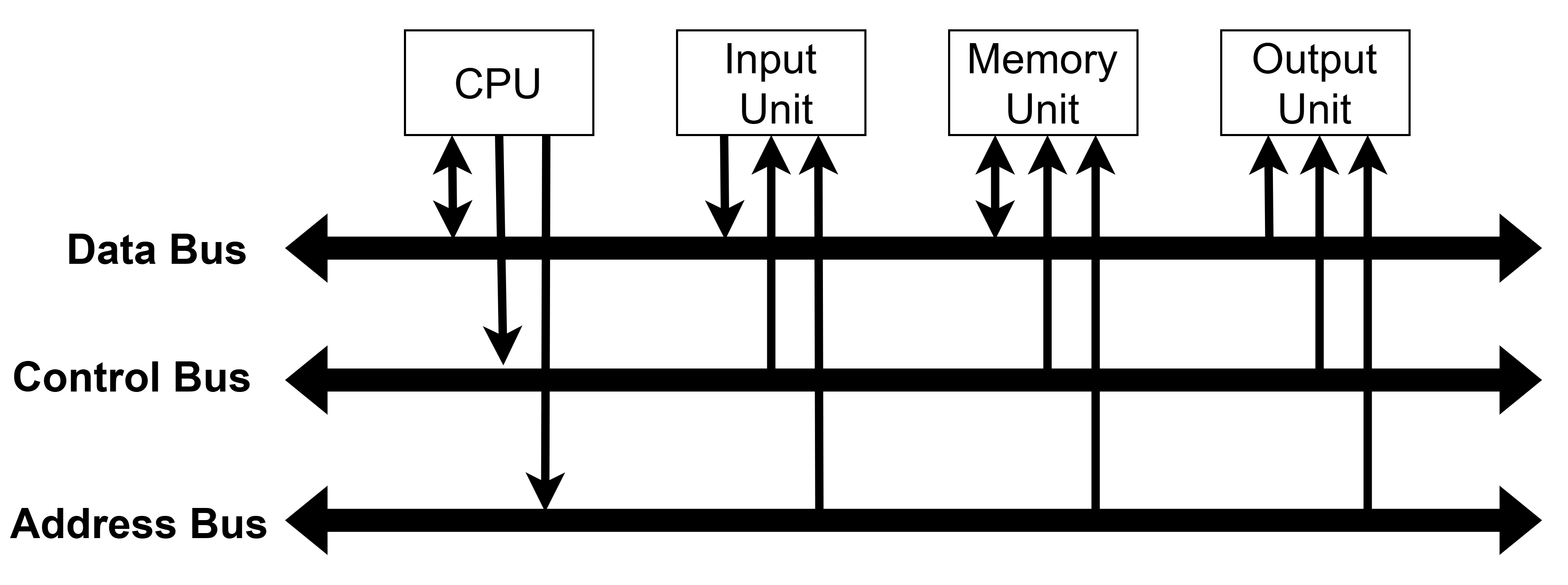 Fig. Bus System
Memory
Primary Memory
Also called system memory / main memory / internal memory. Directly associated with CPU — short-term storage.
Three tasks: holds data for processing · holds instructions for processing · holds processed data waiting for output/storage.
Features: directly accessible to CPU · faster and more expensive than secondary memory · semiconductor memory · used for smaller, temporary storage.
RAM (Random Access Memory)
- Read/write memory — CPU can access any location randomly.
- Volatile — data lost when power is off.
- Stores: instructions waiting/being executed, data waiting/being processed, data waiting for output.
| Static RAM (SRAM) | Dynamic RAM (DRAM) |
|---|---|
| Retains data as long as power is ON | Loses data even with power ON (needs refresh) |
| No refreshing circuit needed | Needs periodic refreshing circuit |
| Faster | Slower than SRAM |
| Uses flip-flop (transistors) | Uses capacitor + transistor per cell |
| Stores bit as voltage | Stores bit as charge |
| More expensive | Cheaper |
ROM (Read Only Memory)
- Read-only; non-volatile — data permanent even after power off.
- Used for permanent storage of boot programs.
| RAM | ROM |
|---|---|
| Read and write | Read only |
| Volatile | Non-volatile |
| Larger memory space | Usually less memory space |
| Used during processing | Used during booting |
Types of ROM:
- PROM — Programmable once by user using a ROM burner.
- EPROM — Erased using UV light (entire data erased); reusable.
- EEPROM — Erased/reprogrammed electrically, byte by byte; fastest erase; no circuit removal needed.
Cache Memory
- High-speed memory placed between RAM and CPU.
- Holds most frequently used instructions to reduce CPU waiting time.
- Cache hit — data found in cache (fast). Cache miss — fetched from main memory (slow).
- L1 cache: smaller, faster, checked first. L2 cache: larger, slower.
- Types: Internal cache (inside CPU) and External cache (outside CPU).
Buffer
- Temporary storage space to hold data before processing (used when data arrives faster than it can be processed).
- Uses FIFO (First In First Out) arrangement.
- Print buffering = spooling (frees computer while printer works in background).
- Located mainly in RAM; used for I/O processes.
Secondary Memory
Also called auxiliary / backup memory. Non-volatile, slower, and cheaper than primary memory. Stores large volumes of data permanently; transferred to primary memory when needed.
| Primary Memory | Secondary Memory |
|---|---|
| Main / internal / system memory | Auxiliary / external / backup memory |
| Holds data currently being executed | Holds data/programs permanently |
| Directly accessible to CPU | Not directly accessible to CPU |
| Cannot transfer data between computers | Can transfer data between computers |
| Expensive per bit | Cheaper per bit |
| Faster | Slower |
| Example: RAM, ROM, Cache | Example: Hard disk, CD, DVD, Pen Drive |
Magnetic Memory
Magnetic Disk
- Most common secondary storage; random access device.
- Circular disks (metal/Mylar plastic) coated with iron oxide.
- Data stored in concentric tracks divided into sectors.
Advantages: direct access · shared device · erasable & reusable · less vulnerable to corruption. Limitations: less efficient for sequential apps · less portable · needs dust-free environment.
Hard Disk
- Used for permanent mass storage (OS, programs, databases).
- Multiple platters; each side has a read/write head on a single access arm.
- Made of aluminium coated with iron oxide; standard size: 3.5 inch.
- Rotates at 3600–15000 rpm; average access time ~15ms.
Floppy Disk
- Also called diskette; removable round flexible Mylar plastic disk in a protective case.
- Data stored as magnetized spots on iron oxide film.
- Access time ~150–250ms. Two sizes: 3½ inch and 5¼ inch.
Magnetic Tape
- Thin plastic tape coated with magnetizable substance; sequential access only.
- Used mainly for backup storage and transporting data.
- Available in ½ inch, ¼ inch, 8mm, 3mm widths; cassette form = cartridge tape.
- Capacity: 500 MB to 4 GB+. Data transfer rate: 240 KB/sec.
Optical Disk
Removable disk; data written/read using laser beams. High storage capacity, relatively cheap.
Advantages: very low cost-per-bit · no mechanical head contact (reliable) · data permanent · compact and lightweight. Limitations: CD-ROM/WORM are read-only · slower than magnetic disk · sensitive to scratches/dust.
| Type | Description |
|---|---|
| CD-ROM | Read-only; stores text, graphics, audio, video |
| CD-R | Write once, read many (WORM); photosensitive dye changes on laser exposure |
| CD-RW | Rewritable; same capacity as CD; overwritable ~100 times |
| DVD-ROM | High capacity; stores video, audio, data; replaces CD-ROM/VHS |
| DVD-R | Recordable once; capacity 4.7 GB (6.4× CD-R) |
| DVD-RW | Rewritable; 4.7 GB; rewritable ~1000 times; used for backup & home video |
| Blu-ray (BD) | Uses blue-violet laser (405nm); 25 GB (single layer), 50 GB (dual layer); HD video |
Other Storage Devices
| Device | Key Features |
|---|---|
| Flash Memory | Non-volatile; credit-card-sized; inserted in motherboard slots; retains data when powered off |
| Pen Drive | Portable USB flash storage; pocket-sized; plug into USB port; drag-and-drop file transfer |
| SSD (Solid-State Drive) | No spinning disk or moving parts; faster than HDD; shock-resistant; silent; low latency; lightweight |
Input Devices
An input device converts input data into a form acceptable to the computer. It is the medium of communication between user and computer.
Examples: Keyboard, Mouse, Trackball, Touchpad, Joystick, Light Pen, Touch Screen, Scanner, Bar Code Reader, OCR, OMR, MICR, Microphone, Digital Camera.
| Device | Description |
|---|---|
| Keyboard | Most common input device; has alphanumeric, punctuation, and special keys; key press stored in keyboard buffer via keyboard controller |
| Mouse | Small hand-held pointing device; rotating wheels detect movement; types: Mechanical, Opto-mechanical, Optical |
| Trackball | Variant of mouse — movable ball on top of a stationary base; rotated with fingers |
| Touchpad | Flat surface; slide fingertip to move cursor; tap to click; used in laptops |
| Joystick | Vertical handle on a base with buttons; used in video games and CAD |
| Light Pen | Light-sensitive stylus connected by wire; used for drawing/selecting on screen; used by engineers and designers |
| Touch Screen | Screen sensitized to finger/pointer input; types: Capacitive, Infrared, Pressure sensitive |
| Digitizing Tablet | Connected to stylus (for sketching) or puck (for copying/tracing); used in design and engineering |
| Digital Camera | Captures images/video in digital form; photos loadable directly to computer storage |
| Scanner | Enters text, images, graphs from paper directly into the computer |
| Bar Code Reader (BCR) | Photo-electric scanner for bar codes; used in supermarkets, libraries, bookshops |
| OCR | Reads printed/handwritten characters via light reflection; converts to computer-readable codes |
| OMR | Reads pencil marks/shades; used for MCQ answer sheets, survey forms, GRE |
| MICR | Reads magnetic ink characters (iron-oxide ink); mainly used in banks for cheque processing |
| Microphone | Records voice/sound input; used for voice mail, videoconferencing, voice chat |
Output Devices
Output unit translates computer-processed information (0s and 1s) into human-understandable form.
Two types of output:
- Softcopy — shown on display screen or heard from speaker; untouchable, temporary.
- Hardcopy — printed on paper/material; touchable, permanent.
Monitor (Softcopy Output Device)
Display screen showing text and graphics; most common softcopy output device.
Classification by Colors:
| Type | Description |
|---|---|
| Monochrome | Displays one color (green/white) against contrasting background; text-only |
| Grayscale | Special monochrome showing varying intensities of gray |
| Color | Displays 16 to millions of colors; designed as RGB monitor |
Classification by Display Technique:
CRT Monitor
- Operates like a TV: electron gun sends beam toward phosphor-coated screen.
- Smallest phosphor dot = pixel; gun scans every pixel top-left to bottom-right.
- Color CRT uses three guns for Red, Green, Blue → called RGB monitor.
| Merits | Demerits |
|---|---|
| Cheaper | Larger and heavier |
| Better brightness | High power consumption |
| Larger viewing angle (~180°) | Not usable in portable devices |
| Better graphics quality | More radiation; not good for eyes |
LCD Monitor
- Creates images using liquid crystal that becomes opaque when electrically charged.
- Used in laptops, cameras, clocks, microwave ovens, CD players.
| Merits | Demerits |
|---|---|
| Smaller and lighter | Limited viewing angle |
| Usable in portable devices | More expensive than CRT |
| Better for eyes (low radiation) | Low brightness in bright environments |
LED Monitor
- Array of light emitting diodes turn on/off to display output.
- Popular for TVs, desktops, laptops, mobiles, tablets.
| Merits | Demerits |
|---|---|
| Smaller, lighter, portable | Expensive |
| Low power requirement | Difficult to maintain |
| Better brightness than LCD and plasma | Low brightness compared to CRT |
| Larger viewing angle (~180°); better for eyes | — |
Gas-Plasma Display
- Uses gas (mainly neon) that emits light when electric current passes between electrodes.
- More expensive; used less often than LCD and LED.
| Merits | Demerits |
|---|---|
| Smaller, lighter, portable | Expensive |
| Low power; better for eyes | Low brightness compared to LCD |
| Larger viewing angle (~180°) | — |
Printer (Hardcopy Output Device)
Peripheral device that prints text, images, and figures on paper — permanent readable form.
| # | Impact Printer | Non-Impact Printer |
|---|---|---|
| 1 | Uses hammers/pins striking ribbon and paper | Uses thermal, laser, or inkjet technology |
| 2 | Less efficient | Higher efficiency |
| 3 | Slow | Fast |
| 4 | Produces noise | Low noise |
| 5 | Cannot print graphics perfectly | Can print graphics perfectly |
| 6 | Can produce multiple copies using carbon paper | Cannot produce multiple copies |
| 7 | Usually single colored | Single or multi colored |
| 8 | Uses ink ribbon | Uses liquid or powder ink |
| 9 | Rarely used today | Popularly used today |
| 10 | Example: Dot Matrix, Daisy Wheel, Line printer | Example: Inkjet, Laser, Thermal printer |
Printer quality depends on: printing speed · resolution (dpi) · memory · color · cost.
Dot Matrix Printer (Impact)
- Print head of small pins (9, 18, or 24 pins) strikes inked ribbon; 24-pin gives best quality.
- Draft quality: 72 dpi; near letter-quality: 144 dpi.
| Merits | Demerits |
|---|---|
| Prints any size/font text and images | Noisy and slow |
| Cheaper; low operating cost | Low print quality |
| Supports carbon copies | Single colored |
Daisy Wheel Printer (Impact)
- Removable flower-like wheel with raised characters; hammer strikes the character.
- Speed: ~90 characters/sec; cannot print graphics.
| Merits | Demerits |
|---|---|
| Better quality than dot matrix | Noisy and slow |
| Supports carbon copies | Cannot print images; fixed font/size only |
Line Printer (Impact)
- Prints a whole line at once; up to 3,000 lines/minute.
- Types: Chain printer (rotating chain) and Drum printer (rotating drum).
- Used for mark-sheets, bank statements, bills, receipts.
| Merits | Demerits |
|---|---|
| Faster (full line at once) | Noisy; lower quality than non-impact |
| Good for continuous printing | Cannot print images; fixed font/size |
| Supports carbon copies | Usually expensive |
Inkjet Printer (Non-Impact)
- Sprays electrically charged ink droplets from four nozzles (CMYK: Cyan, Yellow, Magenta, Black).
| Merits | Demerits |
|---|---|
| Low noise; faster than impact | Expensive ink (high operating cost) |
| Cheaper to buy | No multiple copies |
| Good quality; single/multi colored | Not for continuous printing |
Laser Printer (Non-Impact)
- Entire page processed at once; uses toner (magnetically charged ink powder) transferred via drum.
- Resolution: 300 to 2400+ dpi.
| Merits | Demerits |
|---|---|
| Low noise; very fast | Expensive to buy |
| Low operating cost | No multiple copies |
| Best for large volume printing; high quality | Not for continuous printing |
Thermal Printer (Non-Impact)
- Uses colored waxes and heat to burn dots onto heat-sensitive paper.
- Highest-quality desktop color printing; requires expensive special paper.
| Merits | Demerits |
|---|---|
| Low noise; good quality; multi colored | Expensive to buy and operate |
| Prints any size/font text and images | No multiple copies; not for high-volume printing |
Plotter
Specialized output device producing high-quality graphics in various colors.
- Especially useful for maps, architectural drawings, charts and graphs.
- Uses ink pen or inkjet mechanism; works on paper or plastic sheets.
- Much more expensive than printers.
- Types: Drum plotter, Micro-grip plotter, Flat-bed plotter, Inkjet plotter.
Hardware Interfaces (Ports)
A port is a socket on the outside of the system unit connected to an expansion board inside. It allows connecting peripheral devices to the computer.
Functions: connecting peripherals · transmitting data to/from peripherals · providing electrical power to low-power devices.
| Port | Description |
|---|---|
| Parallel Port | Transmits 8 bits simultaneously; faster than serial but efficient only up to 15 feet; used for printers |
| Serial Port (RS-232) | Sends bits one at a time on a single line; used for slow devices, modems, mice; also called COM port |
| USB (Universal Serial Bus) | Connects many peripherals via a single socket; plug-and-play (no reboot needed); powers low-consumption devices; intended to replace serial/parallel ports |
| HDMI | High Definition Multimedia Interface; transmits high-quality audio and video; cable length 1–50 ft (not recommended above 25 ft); used with HDTV, projectors, game consoles, cameras, Blu-ray players |
| Expansion Slot | Connection inside the motherboard (bus slot/expansion port) for hardware cards (video, sound, network, RAM, ROM); common types: AGP, PCI, PCI Express |